SMSBAT RESTful API
Overview
Довідкова документація по SMSBAT RESTful API, яке найповніше реалізує можливості взаємодії із платформою SMSBAT. Якщо потрібна реалізація з додаванням запитів Viber Bot та/чи Telegram Bot - це доступно в посібнику SMSBAT Cascade API.
Note
Довідкова документація по SMSBAT RESTful API, яке найповніше реалізує можливості взаємодії із платформою SMSBAT. Якщо потрібна реалізація з додаванням запитів Viber Bot та/чи Telegram Bot - це доступно в посібнику SMSBAT Cascade API.
Pricing
Про вартість та умови використання SMSBAT RESTful API та або SMSBAT Cascade API ви можете дізнатись у розділі Тарифи та оплата.
1. Protocol
Як протокол використовується HTTPS. Тіло запиту – JSON‑масив об'єктів messages.
2. Authentication
For your convenience, several authorization options are available:
Login and Password (HTTP Basic Authentication)
The login and password are the same as you use to log into your personal account.
curl -H "Content-Type: application/json"
-X POST -d @/path/to/data.json <url_smsbat_api>/bat/messagelist
--user user:password
API Key in Header
Pass the API key in the HTTP X-Authorization-Key header. The authentication key can be created in the Personal Cabinet in the User Profile.
curl -H "X-Authorization-Key: <токен_доступа>"
-H "Content-Type: application/json"
-X POST -d @/path/to/data.json <url_smsbat_api>/bat/messagelist
API Key as Password
Pass the API key in the HTTP Basic Authentication password (use the 'at' symbol as login).
curl -H "Content-Type: application/json"
-X POST -d @/path/to/data.json <url_smsbat_api>/bat/messagelist
--user @:23ebe88c0224f4f4fc0b608216e98735
Important
Requests to SMSBAT API are sent to an endpoint with localization, please ask your Manager for the address beforehand.
3. Sending Messages
In the SMSBAT platform, any message sending (including single messages) is a Campaign. A single message is a special case of a campaign.
Single Message
Example of sending a single message
{"messages":[
  {
    "from": "ALPHANAME",                    // ваш бренд/підпис
    "to": "380936670003",                   // номер у форматі E.164
    "type": "viber_carousel",               // тип повідомлення
    "ttl": "300",                           // Time‑To‑Live у секундах
    "text": "Погляньте на наші новинки!",   // підпис; може бути порожнім
    "messageData": { ... }                  // специфічні поля типу
  }
]}
Mass Message
Example of sending multiple messages
{"messages":[
  {
    "from":"ALPHANAME",
    "to":"380936670003",
    "text":"test message",
    "type":"sms",
    "customerMessageId":"dc84a6a6-7831-11ec-968b-0025906c040e"
  },
  {
    "from":"ALPHANAME",
    "to":"380736670003",
    "text":"test message2",
    "type":"sms"
  }
]}API Response
After successful message sending, API returns information about created campaign and messages
{"messagelistId":11292,"messages":[
  {
    "messageId":1546807,
    "from":"ALPHANAME",
    "to":"380936670003",
    "text":"test message2",
    "dtExpire":null,
    "customerMessageId":"dc84a6a6-7831-11ec-968b-0025906c040e",
    "partsCount":1,
    "type":"viber_promo"
  }
]}
4. Message Status
Для проверки статуса сообщения необходимо отправить GET запрос
curl -X GET https://api.smsbat.com.ua/bat/message/12345 --user user:password
4.1. Status Response
{
  "messagelistId":11229,
  "messageId":1366203,
  "deliverystatus":"delivered",
  "partscount":1,
  "cost":0.32
}4.2. Fallback Response Example
Example response with fallback configuration
{
  "messagelistId": 49102177,
  "messageId": 90042370,
  "deliverystatus": "delivered",
  "partscount": 1,
  "cost": 0.4134,
  "fallbacks": [],
  "extendedStatuses": [],
  "partsCount": 1,
  "rate": 0.00839,
  "rateAmount": 0.00839,
  "rateCurrency": "EUR",
  "billAmount": 0.413417,
  "billCurrency": "UAH"
}
5. Message Type Features
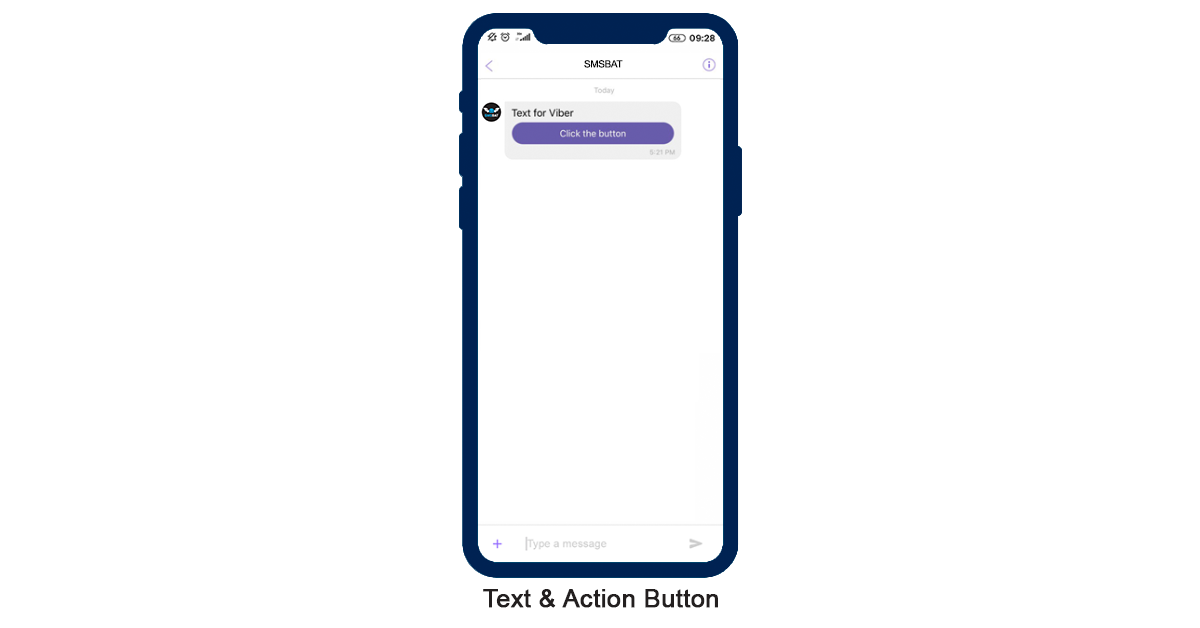
5.1. Viber Promo Message Type



5.2. Viber Transactional Message Type


5.3. Viber Carousel Message Type

{
  "messages":[
    {
      "from":"ALPHANAME",
      "to":"380936670003",
      "type":"viber_promo",
      "text": "Text for Viber",
      "ttl": 300,
      "messageData": {
           "carousel": {
                    "items": [
                        {
                            "title": "50% Off on All Shoes!",
                            "imageUrl": "https://cdn-web.smsbat.com/help/carusel.png",
                            "primaryButton": {
                                "label": "Shop Now",
                                "actionUrl": "https://help.noetikos.org"
                            },
                            "secondaryButton": {
                                "label": "View Details",
                                "actionUrl": "https://omni.noetikos.org"
                            }
                        },
                        {
                            "title": "New Arrivals: Summer Collection",
                            "imageUrl": "https://cdn-web.smsbat.com/help/carusel.png",
                            "primaryButton": {
                                "label": "Explore",
                                "actionUrl": "https://help.noetikos.org"
                            },
                            "secondaryButton": {
                                "label": "Learn More",
                                "actionUrl": "https://omni.noetikos.org"
                            }
                        }
                    ]
                }
            }
        }
    ]
}
5.4. Viber Survey Message Type

{
  "messages": [
    {
      "from": "ALPHANAME",
      "to": "380936670003",
      "type": "viber_survey",
      "text": "Тестовое сообщение",
      "ttl": 30,
      "messageData": {
        "survey": {
          "options": [
            "option1 text",
            "option2 text",
            "option3 text",
            "option4 text",
            "option5 text"
          ]
        }
      }
    }
  ]
}
5.5. Viber OTP Message Type

{
  "messages": [
    {
      "from": "ALPHANAME",
      "to": "380936670003",
      "type": "viber_otp",
      "text": "",
      "ttl": "90",
      "messageData":{
        "templateId": "6c929cef-29b4-4349-bc9d-2a07bdbb6e43",
        "templateLang": "uk",
        "templateParams": {
          "pin": 321,
          "business_platform_name": "SMSBAT",
          "code_validity_time": 7
        }
      }
    }
  ]
}
OTP Templates (1-9)
1. 1. Basic OTP
Template ID: 0aac888f-2ee2-4112-9659-1755a951966a
English Copy:
Your code is Please don't share your code with ANYONE. We'll never call or message you and ask for it.
Parameters & Validations
– TEXT
2. 2. Basic OTP valid for 5 minutes
Template ID: c2cdc028-a48b-4187-bbaf-3aaa137b6e23
English Copy:
Your code is It's valid for 5 minutes. Please don't share your code with ANYONE. We'll never call or message you and ask for it.
Parameters & Validations
– TEXT
3. 3. OTP with business/platform name
Template ID: c33cccaf-735f-4d62-8383-a76bf4999e2d
English Copy:
Your code is Please don't share your code with ANYONE. We'll never call or message you and ask for it.
Parameters & Validations
– TEXT, – TEXT
4. 4. Basic OTP with code validity time
Template ID: bed0942f-e07e-4879-834b-29cc4cf3ec35
English Copy:
Your code is It's valid for minutes. Please don't share your code with ANYONE. We'll never call or message you and ask for it.
Parameters & Validations
– TEXT, – NUMBER
5. 5. OTP with code type & validity time
Template ID: 60d67b38-b9fb-444a-80e6-754447e010c6
English Copy:
Your code is It's valid for minutes. Please don't share your code with ANYONE. We'll never call or message you and ask for it.
Parameters & Validations
– TEXT, – TEXT, – NUMBER
6. 6. OTP with business/platform name & validity time
Template ID: 6c929cef-29b4-4349-bc9d-2a07bdbb6e43
English Copy:
Your code is It's valid for hours. Please don't share your code with ANYONE. We'll never call or message you and ask for it.
Parameters & Validations
– TEXT, – TEXT, – NUMBER
7. 7. OTP with type of code type
Template ID: 82ba31a3-db42-4e87-82e8-33fa92b9e5ed
English Copy:
Your code is Please don't share your code with ANYONE. We'll never call or message you and ask for it.
Parameters & Validations
– TEXT, – TEXT
8. 8. OTP with details on OTP action/platform
Template ID: 210ee8a9-1ed5-43cd-96e4-65bba311ab40
English Copy:
Your code is Please don't share your code with ANYONE. We'll never call or message you and ask for it.
Parameters & Validations
– TEXT, – TEXT, – TEXT
9. 9. OTP with business/platform name & code reason
Template ID: be56d97b-2a33-4c89-ac5f-f555a2c827d9
English Copy:
Your code is
Parameters & Validations
– TEXT, – TEXT, – TEXT
Variable Validation
All variables are case-sensitive and must have exact names as specified below.
Regular rules
Only one variable type per template: or etc. All variables must be declared in exact case and format.
Localization
Supported languages and their ISO codes
Note
Якщо потрібна інша мова, зв'яжіться з підтримкою.
5.6. RCS Message Type
RCS (Rich Communication Services) lets you combine media, buttons, and carousels in a single request to create native Android messaging experiences.
Delivery Options
- Text
- Text + button
- Image + text + button
- Video + (text + button) — optional text/button
- File + (text + button) — optional text/button
- Carousel
Request Examples
5.7. Flash Call
{
  "messages":[
    {
      "from":"FLASHCALL",
      "to":"380500000000",
      "text":"340",
      "type":"flashcall"
    }
  ]
}
6. Incoming Viber Messages
Доступны callback-запросы в сторону клиента с передачей входящего Viber-сообщения, принятого платформой.
How to use?
Provide us with your callback-URL to link in the alpha-name.
7. Fallback Messages
Configure fallback messages when primary delivery fails
7.1. Viber Promo Fallback
SMS fallback for Viber promo messages
{
  "messages": [
    {
      "from": "ALPHANAME",
      "to": "380936670003",
      "type": "viber_promo",
      "text": "Text for Viber",
      "ttl": "300",
      "messageData": {
        "img": "https://cdn-web.smsbat.com/help/carusel.png",
        "buttonText": "Button text",
        "buttonAction": "https://help.smsbat.com"
      },
      "fallbacks": [
        {
          "from": "ALPHANAME",
          "to": "380936670003",
          "type": "sms",
          "text": "Замовлення №111 вже чекає на тебе в магазині",
          "ttl": "5600"
        }
      ]
    }
  ]
}
7.2. Viber Survey Fallback
SMS fallback for Viber survey messages
{
  "messages": [
    {
      "from": "ALPHANAME",
      "to": "380936670003",
      "type": "viber_survey",
      "text": "Тестовое сообщение",
      "ttl": 30,
      "messageData": {
        "survey": {
          "options": [
            "option1 text",
            "option2 text",
            "option3 text",
            "option4 text",
            "option5 text"
          ]
        }
      },
      "fallbacks": [
        {
          "from": "ALPHANAME",
          "to": "380936670003",
          "text": "test sms fallback message2",
          "type": "sms"
        }
      ]
    }
  ]
}
7.3. Viber Transactional Fallback
SMS fallback for Viber transactional messages
{
  "messages": [
    {
      "from": "ALPHANAME",
      "to": "380936670003",
      "type": "viber_trans",
      "text": "Text for Viber",
      "ttl": "300",
      "messageData": {},
      "fallbacks": [
        {
          "from": "ALPHANAME",
          "to": "380936670003",
          "type": "sms",
          "text": "Text for SMS",
          "ttl": "5600"
        }
      ]
    }
  ]
}
7.4. Flash Call Cascade
Multi-channel fallback for flash call verification
{
  "messages": [
    {
      "from": "ALPHANAME",
      "to": "380936670003",
      "type": "flashcall",
      "text": 321,
      "ttl": "30",
      "fallbacks": [
        {
          "from": "ALPHANAME",
          "to": "380936670003",
          "type": "viber_otp",
          "text": "",
          "ttl": "90",
          "messageData": {
            "templateId": "6c929cef-29b4-4349-bc9d-2a07bdbb6e43",
            "templateLang": "uk",
            "templateParams": {
              "pin": 321,
              "business_platform_name": "SMSBAT",
              "code_validity_time": 7
            }
          }
        },
        {
          "from": "ALPHANAME",
          "to": "380936670003",
          "type": "sms",
          "text": "Text for SMS 321"
        }
      ]
    }
  ]
}